Upgrading
GPU Renderer Update
The GPU backend is an additional render path; CPU (Deprecated) remains available. Review the following when upgrading an existing project:
- Backend selection: Choose GPU explicitly on the deformation component. Enabling RealtimeMeshComponent does not redirect GPU rendering to RMC. See GPU Backend.
- Prepared LODs: GPU uses the LODs available in the prepared Deformable Mesh Asset. CPU-PMC remains LOD 0 only; CPU-RMC retains its LOD support. This update does not replace asset preparation with runtime extraction from the parent mesh.
- Regional resistance (new): To use this new feature, add Damage Zone boxes under the intended deformation component. Earlier released versions did not have these regional resistance settings, so there is no previous zone configuration to migrate. No boxes means neutral regional resistance, not automatic front/rear zones.
- Multiplayer projects with custom Blueprint hit replay: If you wrote a Blueprint loop that reads stored hits and applies them again when a vehicle becomes relevant, do not run that loop in addition to the plugin's native recovery. Otherwise the same stored impact can deform the mesh twice. This does not refer to normal collision events or ordinary manual hits. If you have no custom history-replay graph, no additional replay loop is needed. See Replication before migrating an existing custom graph.
- Materials: Continue using the red vertex-color channel for scratch blending. Apply runtime material changes through Get Mesh Component, not the hidden source mesh.
- Complete installation: Replace the matching plugin binaries and shader sources together. The GPU update stores its shaders under
Source/DeformableMeshComponent/Shaders/Private. Older binaries can expect a different physical layout; do not mix files from different releases. - Chaos examples: Chaos Vehicles is optional for the core component. Enable it yourself before loading or playing the Chaos vehicle examples. See Examples.
Where the shader files belong
The shader path above is relative to the plugin's installation folder, not the project's Content Browser. For a project-local installation, the deformation shader is:
<Project>/Plugins/DeformableStaticMesh/Source/DeformableMeshComponent/Shaders/Private/DeformableMeshGpuRenderer.usf
The current module maps that physical directory to the virtual shader path /Plugin/DeformableStaticMesh. Content holds Unreal assets such as materials and examples; it is not the shader-source directory in this version. Do not move the .usf files into Content or edit the engine to change this mapping.
Existing actors need new Damage Zone box components only if you want regional resistance. The update does not automatically create boxes or rewrite your Blueprint graphs. Basic deformation continues without boxes. The new advanced damage debug is off by default.
Version 1.X to 2.X
DataTable Migration
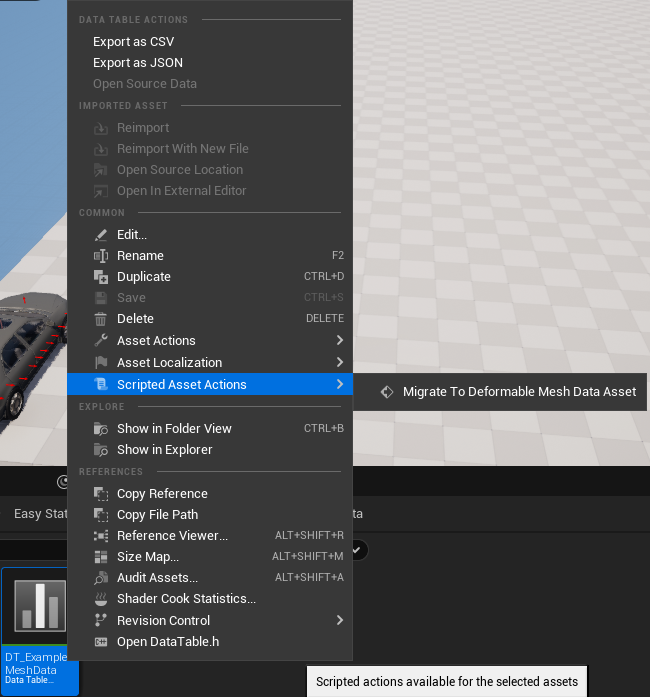
You can either migrate your existing DeformationData-DataTables using our Scripted Asset Action or alternatively (maybe even better) create the Deformable Mesh assets from scratch. The old DataTables are not used anymore and can be deleted.
Breaking changes
- Property
Mesh Data Table=>Deformable Mesh - Property
Vehicle Materials=>Material Overrides - Function
AddHitAtLocation: Renamed and new parameters - Function
ResetDeformation: Renamed and replicated - Hazard lights material parameter:
Hazzard=>HazardStatus - Properties for experimental functions Hazard Lights and Impact Sound were renamed
Version 2.2 to 2.3
Breaking changes
- The custom material functions are deprecated. They are not required anymore, because you can simply use the generic material functions provided by the mesh component itself. See the linked topic for more information.
- Hazard lights are not included in the component itself anymore. The logic is very specific and that's why we moved it to the example car blueprint.